



Browse all articles
Send or fetch data before or after a call
Fetch context from your systems before a call starts, or send call data to your CRM or automations after it ends.
Last updated:
On this page
The Call API skill lets your agent send or retrieve information from an external system. It runs at one of three moments in the call lifecycle: before the call, during the call, or after the call.
This article covers the Pre Call and Post Call modes, which behave almost identically apart from when they run.
For API calls that run during an active conversation (triggered by the agent based on what the caller says), see Look up live data during a call. That mode has additional capabilities, including the Results / Path field for extracting nested data from the response.
When to use it
Use Pre Call to fetch context the agent needs during the conversation:
- Customer profile, account status, membership tier
- Recent orders, bookings or open tickets
- Anything you want the agent to reference mid-call without having to ask the caller for it
Use Post Call to send call data to another system after the conversation ends:
- Push lead outcomes, extracted data or call summaries to your CRM
- Trigger an automation workflow in Make.com, n8n, Zapier or a custom endpoint
- Update a ticketing system, write to a database, or kick off a follow-up process
Note: if all you want is to be notified about call results by email, use the platform's built-in notification settings; you don't need Post Call for that. Post Call is for sending data to other software systems.
How it works
The skill makes an HTTP request at the chosen moment:
- Pre Call runs once, right before the conversation begins. The response data is available to the agent during the call.
- Post Call runs once, after the call ends. The response is not used by the agent (the call is already over): Post Call is one-way data delivery.
You control:
- When the request runs (Pre Call or Post Call)
- The endpoint: URL and HTTP method (GET or POST)
- Parameters: extra values to send with the request
- Headers: authentication tokens or custom headers, if needed
Setup steps
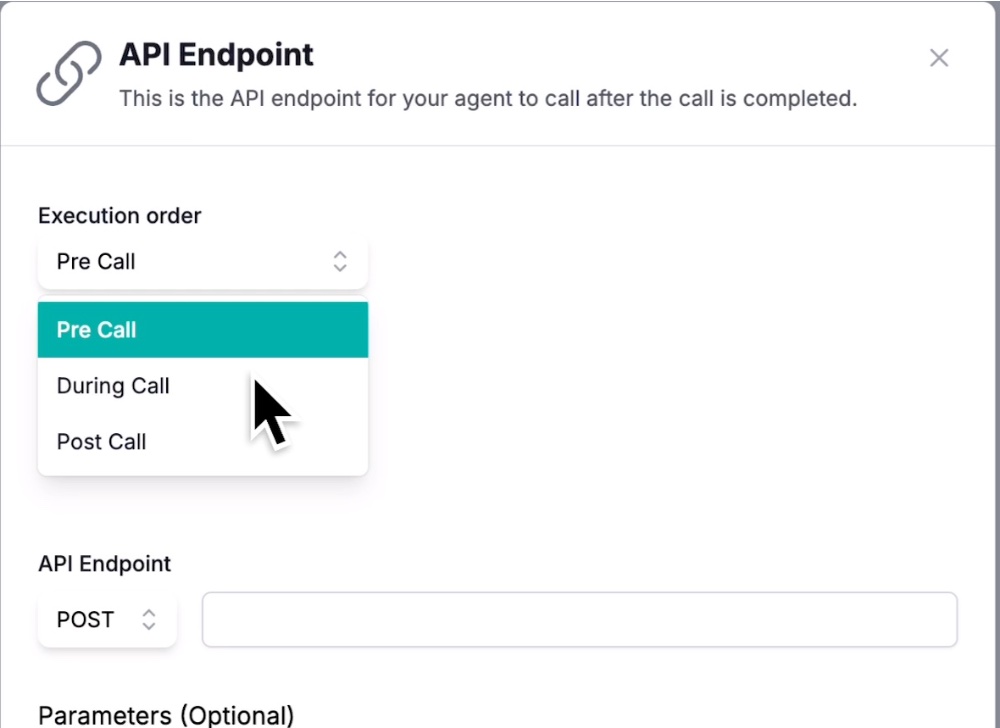
- Go to Agent → Skills → Call API.
- Click Add API Endpoint.
- Configure the fields:
- Execution order: Pre Call or Post Call
- API endpoint: the full URL of your endpoint
- Method: GET or POST
- Parameters (optional): additional values to send; see "Parameters" below
- Headers (optional): authorization tokens or custom headers. Webhook endpoints from Make.com, n8n or Zapier typically don't need auth; leave this empty in those cases.
- Toggle Activate skill to enable it.
- Click Create.
Pre Call: using the response in conversation
When your Pre Call endpoint returns data, the agent can reference each field directly by its key name in the Main Objective.
Example response
{
  "customer_name": "Ferguson",
  "membership_tier": "Gold",
  "membership_expires": "2027-06-23",
  "last_order_id": "ORD-4471",
  "order_status": "shipped"
}
Referencing fields in the Main Objective
After confirming the caller's identity, mention that their
{{membership_tier}}membership is valid until{{membership_expires}}. If they ask about their most recent order, reference{{last_order_id}}and tell them it is currently{{order_status}}.
The agent uses each {{field_name}} as a direct substitution from the response payload.
Keep the response flat. Pre Call doesn't have a Path field, so there's no way to extract values from nested JSON. To make response data usable:
- Return flat JSON, no nested objects.
- Use clear, descriptive keys:
customer_namerather thanname,membership_tierrather thantier.- Flatten any nested source data on your endpoint before responding.
Harder for the agent to use:
{
  "customer": {
    "name": "Ferguson",
    "membership": { "tier": "Gold" }
  }
}
Post Call: what gets sent automatically
Post Call requests automatically include a rich payload built from the call itself; you don't need to define parameters to capture this. Typical fields the platform sends:
transcript: full conversation transcript between agent and callercall_extract: structured data extracted during the call (summary, outcome, plus any custom fields you've configured for extraction)prompt_params: any parameters that were passed when the call was triggered via API (outbound calls)call_id,agent_id: identifiers for the call and agentphone_number: the caller's numberstatus: call status (for examplereached,no_answer)
You can add additional static Parameters in the skill configuration if you want to include constants alongside this auto-generated payload, for example a source: voice_agent field to tag where the data came from in your CRM.
Parameters
Each parameter has a Name and a Description. For Pre Call and Post Call, parameters are typically static: the value written in the Description is sent as-is on every call.
| Name | Description |
|---|---|
source | voice_agent |
The payload sent to your endpoint will always include "source": "voice_agent".
Pre Call parameters are mostly used to tell your endpoint what kind of request this is or which agent is calling. Phone number is the only commonly useful dynamic value for Pre Call; if you need it, add it as a parameter.
For Post Call, the auto-generated payload usually contains everything you need; additional parameters are optional.
Worked example: Pre Call customer lookup
Scenario: an outbound agent calls a customer to confirm a recent purchase. The agent needs to know who the customer is and what their last order was, but shouldn't ask the customer for this information directly.
Action configuration:
- Execution order: Pre Call
- API endpoint: your customer-lookup webhook (for example a Make.com scenario that queries your CRM)
- Method: POST
- Parameter:
phone_number(dynamic, from the call context)
Response your endpoint returns:
{
  "customer_name": "Ferguson",
  "membership_tier": "Gold",
  "last_order_id": "ORD-4471",
  "order_status": "shipped"
}
Initial Message (set separately in agent settings, not here):
Hello, this is Anna from Kollie.AI. Am I speaking with the account holder?
Main Objective:
- Confirm you are speaking with the account holder.
- Once confirmed, let them know their most recent order
{{last_order_id}}is currently{{order_status}}.- As a
{{membership_tier}}member, they're eligible for priority support. Mention this if it's relevant.- Ask if everything is in order.
- End the call.
The agent can only reference Pre Call data after the conversation is underway, never in the initial greeting. See "Things to know" below for why.
Worked example: Post Call CRM update
Scenario: after each call, push the extracted lead data to your CRM so sales can follow up.
Action configuration:
- Execution order: Post Call
- API endpoint: your CRM webhook (for example a Make.com scenario that creates or updates a contact)
- Method: POST
- Parameters: optional, for example
source: voice_agentto tag the data origin - The auto-generated payload (
transcript,call_extract,phone_number,status, etc.) is sent automatically; your endpoint reads what it needs.
No Main Objective changes are needed. Post Call runs automatically when the call ends.
Things to know
Pre Call data is not available in the Initial Message
The Initial Message is sent the moment the call connects, usually before the Pre Call request has finished responding. If your Initial Message contains something like:
Hello {{customer_name}}, I'm calling about your {{membership_tier}} membership.
…it will likely come through with empty placeholders: Hello , I'm calling about your membership.
Workaround: if you need data in the Initial Message, pass it as a parameter when triggering the call via the platform API (outbound calls only). Parameters passed at trigger time are available from the very first millisecond of the call. Pre Call is for data the agent uses once the conversation is underway, not at the very first turn.
No native error handling
If your endpoint times out, returns an error, or sends back empty fields, the skill has no built-in fallback. The agent will simply have no data, which may cause it to skip parts of the prompt, ask the caller to repeat themselves, or in some cases hallucinate.
Workaround: add explicit fallback instructions in your Main Objective. Example:
Reference the caller's most recent order using
{{last_order_id}}. If you don't have this information, let them know you'll notify the team and they will follow up as soon as possible.
Fallbacks should be specific. Vague fallbacks lead to vague hallucinations.
Post Call responses are ignored
Whatever your Post Call endpoint sends back is discarded. The call has already ended, so there's nothing the agent can do with response data.
Authentication
If your endpoint needs authentication, add the credentials in the Headers field (for example Authorization: Bearer your-token-here). Most webhook services don't require headers; leave that section empty in those cases.
The Call API skill in Pre Call and Post Call modes is the simplest way to connect your agent to external systems for context and for downstream automation. For real-time, in-conversation API calls based on caller input, see Look up live data during a call.
Related articles
- Transfer calls to a person or departmentLet your AI agent hand an active call over to a person, a department or an external partner, and pick the right destination.
- Capture details from every call automaticallyAutomatically capture key details from every conversation, such as the caller's name, interest level or chosen product.
- Let your agent book appointmentsLet your AI agent check calendar availability and book appointments in Outlook, Google Calendar or Microsoft Bookings during the call.
Still need help?
Can't find the answer you're looking for? Send us a ticket and our support team will help you set up and improve your agents.
Submit a support ticket