



Browse all articles
How to build your AI phone agent
How to build an AI phone agent in the Kollie web app: what to write in each field, where to write it, and what to leave out.
Last updated:
On this page
1. About this guide
This guide covers building an agent in the Kollie web app: what to write in each field, where to write it, and what to leave out.
Building through the API? The fields and the rules are identical; only the mechanics differ. See Build an agent with the API.
Read section 2 first, then prepare your answers to the questions in section 3 before you open the agent settings. Each skill, such as Call Transfer, has its own page, and this guide links to those pages where they are needed.
Throughout this guide we build one example agent for Meridian Motors, a fictional car dealership in Utrecht. Each section adds the next part of it.
2. The parts of an agent
An agent has five components, each with a specific purpose:
| Piece | Where you set it | Can you change it? | What it is for |
|---|---|---|---|
| Platform Default Instructions | Set by the platform | No. Identical on every agent. | Phone manners: tone, pacing, how numbers and email addresses are spoken, knowing today's date. |
| Introduction | Agent settings | Yes | The first thing said when the call connects. |
| Business Information | Agent settings | Yes | The facts. Who you are, what you sell, hours, policies, people. |
| Main Objective | Agent settings | Yes | The plan for the call. Steps, conditions, what to do when. |
| Skills | Agent → Skills | Yes | Actions the agent can take. Each has its own description. |
Every agent already has a set of built-in instructions that you cannot see or edit. They cover more than you would expect. When an instruction you wrote has no effect, the usual cause is that the platform already handles it, and the agent now has two versions of the same rule.
Everything you write has exactly one correct place. If you write something twice, one of the two copies is a bug.
When the same idea appears in two places in slightly different words, the agent has to pick one, and it may not pick the same one every time. This is a common cause of an agent behaving differently from one call to the next.
3. Before you start
One agent has one function
Important: Give each agent one function. A receptionist agent, for example, answers common questions, takes messages, and transfers the caller to a person when it cannot help. If you also need appointment booking or sales qualification, build a separate agent for each, so every Main Objective stays short and each decision has one place.
Wrong example
The agent answers questions about the dealership, takes messages for the workshop, books test drives into the sales calendar, calls customers about unpaid invoices, and qualifies leads for finance offers.
Good example
The agent answers common questions, takes messages for the workshop, and transfers purchases and complaints to a person.
Questions to answer
Answer these questions before you open the agent settings. The answers fall into two groups, and each group becomes one field: facts go in Business Information, and what the agent should do goes in the Main Objective.
Business Information
- What does your organization do?
- What facts should the agent know or tell callers?
Main Objective
- What is the agent's main job?
- What are the three most common reasons people call?
- What should the agent do in each case?
- When should the agent transfer, escalate, or take a message instead?
Example: Meridian Motors
Meridian Motors is a fictional car dealership in Utrecht that sells new and used vehicles and has an on-site workshop. They want a telephone receptionist that welcomes callers, finds out why they are calling, and answers the question, takes a message, or transfers them to a person.
Business Information
- What does your organization do? Meridian Motors is a car dealership in Utrecht, founded in 1998. It sells new and used vehicles and has an on-site workshop.
- What facts should the agent know or tell callers? Opening hours: Monday–Friday 09:00–18:00, Saturday 10:00–16:00, closed Sunday. The dealership sells new and used cars and has an on-site workshop. Departments: sales, service (workshop and repairs) and parts. Test drives can be booked for any car in the showroom. Trade-in valuations are done in person, not over the phone.
Main Objective
- What is the agent's main job? Welcome callers, find out why they are calling, and answer the question, take a message, or transfer them to a person.
- What are the three most common reasons people call?
- Buying a new or used car.
- Asking about the workshop.
- General information, such as opening hours.
- What should the agent do in each case?
- Car purchase: transfer to sales.
- Workshop enquiry: take the caller's name and a brief message for the team.
- General information: answer using available business information. If unknown, offer to transfer the call or take a message.
- When should the agent transfer, escalate, or take a message?
- Transfer: if the caller wants to buy a car, transfer to sales.
- Escalate: if the caller wants to make a complaint or asks something outside of what the agent knows, transfer to the manager.
- Take a message: for workshop enquiries, collect the caller's name and reason for calling. Tell them the team will receive the message without promising a callback time.
- Answer directly: for questions about opening hours or whether the dealership sells new and used cars, provide the information without transferring.
Important: Do not make a transfer depend on the time of day. The agent cannot reliably check the time, so it cannot tell whether sales is open. Handle hours in your phone system instead (see section 6).
Important: Do not ask the caller to provide a phone number; the agent already has it when it answers.
4. Creating the agent
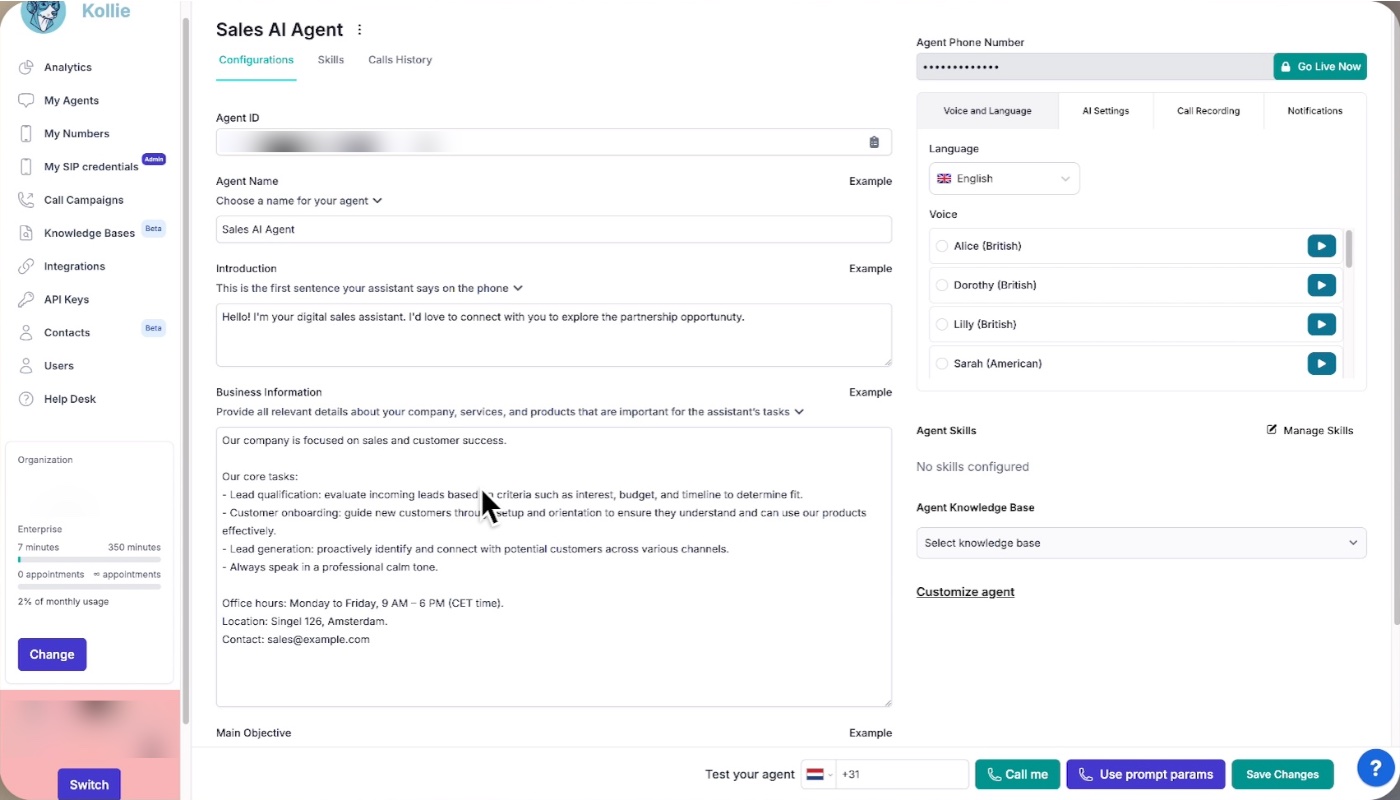
- Create Agent in the My Agents page.
- Give it a name. Use
[TEAM]-[LANG]-[FUNCTION], likeSALES-EN-DEMOBOOKINGorSUPPORT-DE-BILLING. A consistent pattern keeps agents easy to find as their number grows. Meridian's agent isRECEPTION-EN-FRONTDESK. - Write the Introduction: the first thing the agent says when the call connects. See section 5.2.
- Fill in Business Information: the facts about the business. See section 5.3.
- Write the Main Objective: what should happen on this call. See section 5.4.
- Set the voice settings:
- Choose the voice. Each voice speaks at its own speed, and speed cannot be set separately. Make test calls with several voices, one at a time, and keep the one that suits your callers.
- Set barge-in, which controls whether the caller can interrupt the agent.
- Set the other settings:
- Choose the language.
- Add Industry Terms: words the speech recogniser is likely to mishear. For Meridian, add "Meridian Motors", "Utrecht" and the model names in the showroom.
- Set notifications.
- Set recording. Section 6 lists what each one controls.
- Add any Skills the agent needs, under Agent → Skills. Each one needs its own settings, its own description, and its enable toggle switched on before you click Create. Meridian needs one skill, Call Transfer, with two entries: Sales (+31 20 XXX XX01) and Manager (+31 20 XXX XX02). Section 5.7 covers what to write in each entry's description.
Important: Treat every pre-filled field in a template as a draft someone wrote for a different business. Templates are a fast start, not a finished agent, and their Main Objective text often contains instructions the platform already handles. Read sections 5 and 6, then go through the template field by field.
Important: One agent speaks one language. There is no switching mid-call. If you operate in three languages, you need three agents. If Meridian also takes calls in Dutch, that is a second agent,
RECEPTION-NL-FRONTDESK.
5. What to write in each field
5.1 Which field does this belong in?
| Business Information | Main Objective | Nowhere |
|---|---|---|
| What the business does and sells | The goal of this call | Tone, politeness, friendliness |
| Opening hours, locations, departments | The steps, in order | How to say numbers, dates, email addresses |
| Prices, plans, policies, guarantees | Conditions: if the caller says X, do Y | Interruptions and turn-taking |
| Named people and their roles | When to use a skill | "Be brief", "be polite", "listen carefully" |
| Words and terms your business uses | What is in scope, what is not | Greetings |
| Anything the agent needs to reason with | What to do when something goes wrong | The language and voice |
| How the call should end | Anything that is a setting |
The Platform Default Instructions or a setting already cover everything in the Nowhere column. See section 6 to read more.
A quick way to check the split: Business Information reaches the agent before the Main Objective, so it reads in the natural order: here is who we are, then here is what to do on this call. If your Main Objective opens with three paragraphs about the company, those paragraphs are in the wrong box. Move them. The Main Objective usually gets shorter and clearer at the same time.
5.2 Introduction
The Introduction is the first thing the agent says when the call connects.
- Keep it to two sentences at most, so the caller can start speaking quickly.
- Say that the caller is speaking to an AI assistant, so they know from the start that it is not a person.
- End with a question, so the caller knows it is their turn to speak.
Wrong example
Welcome to Meridian Motors, the trusted name in Utrecht since 1998 for new and used cars, servicing and parts. Our showroom is open six days a week and our workshop team is always ready to help.
This is too long, does not say the caller is speaking to an AI, and does not end with a question, so the caller does not know when to speak.
Good example
Hello, you are speaking with the AI assistant of Meridian Motors. How can I help you today?
You can use placeholders in the Introduction, for example to greet a caller by name. See section 5.6.
5.3 Business Information
Business Information holds the facts about the business.
- Write facts, not instructions. This field is for what is true about the business, and the platform already handles tone.
- Write down everything the agent needs to know. The agent cannot open a website, so "see our website" gives it nothing.
- State opening hours as a fact the agent can tell callers, never as a condition it acts on. The agent cannot reliably check the time (see section 6).
How much to write
There is no hard limit, so the constraint is judgement.
The whole block sits in front of the agent on every turn of every call. That makes it reliable, because nothing is searched for, and it means length has a real cost. A long block spends tokens on every turn and spreads the agent's attention across material most calls never touch.
Write what the agent needs to hold a competent conversation about your business. A well-organized page of facts is enough; an entire operations manual is too much. Meridian's Business Information is in section 5.5.
5.4 Main Objective
The Main Objective is the plan for the call: the steps, the conditions, and what to do when.
Say what is in scope, explicitly. Section 6 explains why, and section 8 covers the out-of-scope list.
Give every risky instruction a fallback. If a step depends on data from an outside system, say what to do when that data does not arrive. Without a specific fallback, the agent makes something up.
Tell the caller their order status. If you do not have it, apologize and offer to follow up by email.
Define the ending. Without one, the agent waits for the caller to hang up, and those minutes are billed.
Before ending, ask if there is anything else. If they say no, say goodbye and end the call.
Write when to transfer, not where to. The destination numbers live in the Call Transfer skill. Do not write the permission question, the confirmation, or the message for a failed transfer, because the platform already handles them.
Wrong example
If the caller wants to buy a car, ask whether they are happy to be transferred, then transfer them to sales on +31 20 XXX XX01. If nobody answers, apologise and offer to take a message.
Good example
If the caller wants to buy or lease a car, transfer the call to sales.
Do not write steps for after a transfer. A transfer is one-way: once the call is connected, the agent is out of the call and never learns the outcome.
5.5 Meridian Motors: Business Information and Main Objective
This example puts sections 5.3 and 5.4 together for Meridian Motors.
Wrong example
Business Information:
Meridian Motors — the trusted name in Utrecht since 1998. We pride ourselves on excellent customer service and competitive prices, and our team always goes the extra mile. We sell new and used cars and we have a workshop. Opening hours: Monday to Saturday, 9am to 6pm. Always be friendly and professional with our customers and make a good first impression. Never be rude. Contact: sales, service, parts. See our website for the full stock list.
Main Objective:
You are a friendly and professional assistant for Meridian Motors. Meridian Motors is a car dealership in Utrecht founded in 1998, selling new and used vehicles with a workshop on site. We are open Monday to Friday from nine until six and Saturday from ten until four. Always be polite and speak clearly, and keep your answers short. Greet the caller warmly. Listen carefully and do not interrupt. Ask the caller for their name and phone number and what they are calling about. If they want to buy a car, transfer them to +31 20 XXX XX01.
Nothing here looks obviously wrong, but there are twelve problems:
| Where | Text | Problem |
|---|---|---|
| Business Info | "the trusted name… we pride ourselves… goes the extra mile" | Marketing copy with no usable facts. The agent cannot answer a single caller question with it. |
| Business Info | "Always be friendly and professional… Never be rude" | Behaviour instructions in the facts field. Wrong on two counts: the field is for what is true, and the platform already handles tone. |
| Business Info | "Contact: sales, service, parts" | Names three departments and says nothing about what any of them does. It cannot be used for answering or for routing. |
| Business Info | "See our website for the full stock list" | The agent cannot open a website. If it needs to know something, it has to be written here. |
| Business Info | "We sell new and used cars and we have a workshop" | Too little detail to be useful. It does not say what the workshop does or whether test drives can be booked. |
| Both | The company description appears twice, in different words | One of the two is redundant. It belongs in Business Information, so delete it from the Main Objective. |
| Both | Opening hours appear twice and disagree: Mon–Sat 9–6 in one field, Mon–Fri 9–6 plus Sat 10–4 in the other | The agent now has two answers to "when are you open" and may not pick the same one every time. Hours are a fact, so they go in Business Information. |
| Main Objective | "friendly and professional", "always be polite", "speak clearly", "keep your answers short" | Already handled → delete |
| Main Objective | "Greet the caller warmly" | Already handled, and the Introduction greeted them → delete |
| Main Objective | "Listen carefully and do not interrupt" | Interruption is handled in the settings. |
| Main Objective | "Ask the caller for their name and phone number and what they are calling about" | Three questions in one step, and the agent already has the phone number and is told not to ask for it. |
| Main Objective | "transfer them to +31 20 XXX XX01" | The number belongs in the Call Transfer skill. Two copies will drift apart, and only one of them dials. |
Good example
Business Information:
Meridian Motors is a car dealership in Utrecht, established 1998. We sell new and used vehicles and run our own workshop on site.
Opening hours: Monday to Friday 09:00–18:00, Saturday 10:00–16:00, closed Sunday.
Departments:
- Sales (showroom)
- Service (workshop and repairs)
- Parts (component orders and collection)
Test drives can be booked for any car in the showroom.
Trade-in valuations are done in person, not over the phone.
Main Objective:
Your objective is to understand what the caller needs and either answer it, take a message, or transfer them to the right person.
- Ask what the call is about.
- If the question is about opening hours, departments, test drives or trade-in valuations, answer it from the business information.
- If the caller wants to buy or lease a car, get a price, arrange a trade-in valuation or book a test drive, transfer the call to sales.
- If the caller wants to make a complaint or speak to a manager, transfer the call to the manager.
- If the call is about the workshop, a repair, a service appointment or parts, ask for the caller's name.
- Then ask for a short message for the team. Tell the caller the team will receive it. Do not promise a callback time.
- If the caller declines a transfer, take a message as in steps 5 and 6.
- Before ending the call, ask whether there is anything else. If the caller says no, say goodbye and end the call.
The Main Objective names two transfer targets, sales and the manager. Each one must match exactly one Call Transfer entry (see section 5.7).
Important: Transfer numbers go in the Call Transfer skill, not in these answers and not in the Main Objective. Meridian needs two entries: Sales (+31 20 XXX XX01) and Manager (+31 20 XXX XX02). You add them in step 8 of section 4.
5.6 Placeholders
{{ placeholder }} tokens work in three fields: Introduction, Business Information and Main Objective. They are filled in at call time, which is what lets one agent greet each caller by name.
Values come from one of two places:
| Source | How | Cost |
|---|---|---|
| Prompt parameters | Passed in when an outbound call is started through the API. | None. Available from the first second. |
| A pre-call lookup | The agent fetches data before the conversation starts. | Delay. The call waits for the request to finish. The more complex the lookup, the longer the pause before anyone speaks. |
Prefer prompt parameters whenever you already know the value.
- Every placeholder needs a real source. Point at where each one gets its value before you save. One with no source renders as nothing, and the sentence collapses:
Hello {{name}}with no source is spoken asHello ,. - Write sentences that survive an empty value in case the data is missing.
- Do not use placeholders in skill descriptions. They work only in the three fields above.
- Placeholders are not passwords. A placeholder in a saved template is a fill-in-the-blank marker for reusing that template with another customer. Never put a real key in one.
Important:
to_phoneis the number the platform dials. It is not a placeholder and does not go in any field. It travels on the same API request as your prompt parameters, but as a sibling of them, not one of them: prompt parameters fill blanks inside the prompt,to_phonetells the platform who to call. The name is fixed and cannot be renamed or aliased. It is outbound only: on inbound calls the caller dials you, so there is noto_phone.
5.7 Skill descriptions
Each skill has its own page with its own rules and examples, starting with Call Transfer. This section covers what applies to every skill description.
Each skill you add has a description. It is not a note for your colleagues. The agent reads it during the call to make a decision, and a vague description can lead to wrong decisions.
A good description says what makes this one different from the others. Two failures cover nearly every bad description:
- It repeats something already handled. "Be polite before using this." The platform does that. The line has no useful effect, and it competes with the built-in instruction.
- It is so generic it fits anything. "For customers who need help." This is true of every skill entry you have, so it does not help the agent choose.
Wrong example
Sales: for customers who need help.
Manager: for customers who need help with something else.
Good example
Sales: callers who want to buy or lease a new or used car, get a price, arrange a trade-in valuation or book a test drive.
Manager: callers who want to make a complaint or ask to speak to a manager.
Three questions to ask about any sentence in a description:
- Does it help the agent choose between entries? If yes, it belongs here. If it helps decide whether to use the skill at all, that is the Main Objective. If it is a fact about the business, that is Business Information.
- Would it be equally true of another entry, or another business? Then it is too generic to be useful.
- If I deleted it, would anything change? If not, leave it deleted.
And one test that catches most of what those three miss: write down ten things a real caller might say. Show someone only your descriptions, without the skill names and the settings, and ask them to sort the ten into the right ones. If a person cannot do it from your descriptions alone, the agent may not be able to do it either.
6. Platform Default Instructions
Every agent has built-in instructions for everything listed below. Do not write any of them in your own fields.
Dates and time
- Today's date, tomorrow, yesterday, and several days ahead.
- Saying times out loud. A time written as
09:00is spoken as "nine o'clock in the morning".
Important: Never write a condition that depends on the current time. The agent cannot reliably check the time and cannot decide whether the business is currently open. It knows today's date and can tell a caller your opening hours. That is not the same as working out whether you are open right now and branching on the answer. Handle it in your phone system: forward to the agent during business hours, to voicemail outside them.
Wrong example
If it is after 18:00, tell the caller we are closed and offer a callback.
Good example
Opening hours: Monday to Friday 09:00–18:00, Saturday 10:00–16:00, closed Sunday. (in Business Information, as a fact)
Pronunciation
- Rules for reading out numbers, prices, years or phone numbers
- Spelling out
@and dots in email addresses
Style and tone
- Being polite, calm, warm, friendly or professional
- Being brief, or keeping answers short
- Speaking in short, conversational sentences
Conversation flow
- Greeting the caller: the Introduction already did.
- Asking one question at a time and waiting for the answer
- Handling a transfer: asking the caller's permission, confirming, connecting without further talk, and what to say if the transfer fails.
What it won't do
- Use exclamation marks.
- Read out code, variable names or internal text.
- Ask the caller for their phone number. The agent already has it.
- Answer off-topic questions. It declines them in general terms.
Set these in settings, not in text
Voice settings
- Which voice → the voice setting. Each voice speaks at its own speed, and there is no separate speed setting.
- Whether the caller can interrupt → the barge-in setting
Other settings
- Which language → the language setting
- Hanging up on voicemail → automatic
- Whether calls are recorded → recording setting
- Who gets notified → notification settings
- Words the system keeps mishearing → Industry Terms, a dictionary you give the speech recognizer so it has a reference for tricky words. Industry Terms is part of the agent configuration, not a skill. Add brand names, product names, jargon and local place names rather than telling the agent to listen harder.
Set these in a skill
- Phone numbers for transfers → the Call Transfer skill
- Which department handles what → that transfer entry's description
- Web addresses, API endpoints, keys → the skill's own fields
- Which details to capture after a call → the Extract Information skill
- Which calendar to book into → the Book Meeting skill
7. Do's and don'ts
Write one question per step. If a numbered step contains three questions, the agent asks them across three turns or drops some. Split them.
Wrong example
5. Ask for the caller's name and a short message for the workshop.
Good example
5. Ask for the caller's name.
6. Then ask for a short message for the team.
Read it aloud. If you stumble, so will the agent. Long sentences and stacked clauses are the most common cause of an agent misunderstanding people.
Keep it as short as it can be.
The table below summarizes the rules from the rest of this guide.
| Do | Don't |
|---|---|
| Give each agent one function (section 3). | Repeat anything from the Platform Default Instructions (section 6). |
| Write each fact or rule in one field only (section 2). | Put a company description at the top of the Main Objective (section 5.1). |
| Keep the Introduction to two sentences, say it is an AI, and end with a question (section 5.2). | Write transfer numbers, endpoints or keys in text (section 6). |
| Give every risky step a specific fallback (section 5.4). | Make anything depend on the current time (section 6). |
| Write what is in scope and what is out, with an exit for each out-of-scope topic (section 8). | Ask the caller for their phone number (section 6). |
| Read back anything spelled or alphanumeric (section 8). | Write steps for after a transfer (section 5.4). |
| Give every repeated question a limit (section 8). | Paste in text you have not read (section 9). |
| Define how the call ends (section 5.4). | Put a key, token or password in any text field (section 9). |
8. Handling calls that don't go to plan
A Main Objective needs instructions for calls that leave the expected path: callers who refuse to answer, go off topic, or give answers the agent cannot use. This section lists the common cases and what to write for each.
Asking the caller for information
Suppose Meridian Motors wants an email address with each workshop message, so the team can reply in writing. The most common mistake is a single instruction:
Wrong example
Ask the caller for their email address so the workshop can reply.
Callers respond to that instruction in many different ways:
- "Why do you need that?"
- "I'd rather not."
- "It's the same one I gave you last time."
- They say it fast, and the transcription hears
jan.dvries@gmail.comasyandi frees at gmail dot com. - They spell it, but only halfway, then give up.
- They give a work address, then change their mind and give a personal one.
The agent has one line of instruction for all of these, so it improvises, and it improvises differently on each call.
Good example
- Ask for the caller's email address so the workshop can reply.
- Repeat the address back and ask them to confirm it before continuing. If they correct you, repeat it back again.
- If they do not want to give an email address, tell them the workshop will call them back instead.
- If you have asked twice and still do not have a usable answer, stop asking. Say we will follow up another way, and continue with the rest of the call.
The good example is longer because each line covers one of the responses above. Where the Main Objective has no instruction, the agent guesses.
Branches to write for every agent
Check your Main Objective against each row.
| The caller… | Without an instruction | What to write |
|---|---|---|
| Refuses to give something | Asks again, or awkwardly moves on | Whether the call can continue without it, and what to do instead |
| Answers a different question | May accept it as an answer to yours | "If they have not answered the question, ask it once more before moving on" |
| Gives an unclear answer | Picks an interpretation and commits to it | "If the answer could mean more than one thing, ask which they mean" |
| Asks three things at once | Answers one, drops the rest | "If they ask several things, answer them one at a time and check you have covered them all" |
| Asks something out of scope | Stonewalls, sometimes rudely | A named exit: what to say, and where to send them |
| Is the wrong person (outbound) | Carries on with the script anyway | "Check you are speaking to the right person before discussing anything specific" |
| Wants to stop, or call back later | Keeps going | An explicit graceful exit, and whether to capture a callback time |
| Is upset or angry | Stays cheerfully on script, which makes it worse | Acknowledge it, stop the script, offer a person |
| Has been asked the same thing twice | Asks a third and fourth time | A stopping rule. Always give repeated questions a limit. |
Important: Give any instruction that can fail a maximum number of attempts and a defined next step. Loops are the most common way a voice agent turns a small failure into a bad call.
Scope: what is in and what is out
A defined scope is two lists, and most Main Objectives contain only the first.
- In scope: the questions the agent should answer directly. Without this, the agent's built-in instruction to stay on topic makes it refuse perfectly reasonable questions.
- Out of scope, together with what happens instead. For example, write "invoices are out of scope; offer to transfer them to accounts, or take a message" rather than "do not discuss invoices".
Important: Give every out-of-scope topic an exit: what to say, and where to send the caller. Without one, the caller's only option is to hang up.
For Meridian, the in-scope list is the one in section 6, and the exits are the transfers and the message in steps 3 to 7 of the Main Objective in section 5.5.
Getting information right over the phone
Speech recognition is least reliable with names, spellings and codes, which are the details that most need to be exact.
- Read back anything alphanumeric. Do this every time for email addresses, post codes, reference numbers, registration plates and order numbers. Write the confirmation step in.
- Add tricky words to Industry Terms. Add your product names, your brand, local place names and jargon. The dictionary gives the recognizer a reference so it stops guessing.
- Decide what is mandatory. For each thing you collect: can the call succeed without it? If yes, say so, and make sure a refusal does not derail everything after it. If no, say what happens when you cannot get it.
- Do not ask for their phone number. The agent already has it and is instructed not to ask in the Platform Default Instructions.
Define what "done" looks like
Write down what a successful call is, what a partly successful call is, and what the agent should do when neither is reachable. Most objectives define only the first, so the agent has no idea what to aim for once the ideal path is gone.
For Meridian's receptionist, that might be: question answered or caller transferred (success); message taken for the team (partial); caller told the opening hours so they can call back (fallback). With all three defined, the agent has a next step when the first is not possible.
Test it like a difficult caller
Before going live, make these calls yourself:
- Answer a different question than the one asked.
- Refuse to give one piece of information.
- Ask something clearly outside the agent's remit.
- Ask three questions in one breath.
- Give a mangled answer, then correct it.
- Change your mind halfway through.
- Ask to speak to a person immediately.
If any of those produces a loop, an invention, or a dead end, you have found a branch you have not written yet. These calls take about fifteen minutes and find problems that reading the prompt does not.
9. Security
Never put a key, token or password in Business Information, the Main Objective, or a skill description. Those fields are read by the agent on every call, and anything the agent has read, it can be talked into saying. Credentials belong in the dedicated fields on the skill that needs them.
Be careful what you paste in. Text from a website, a document, or an outside system can contain instructions aimed at the agent rather than facts about your business. Scraping a company's website into Business Information is fast, and it also means text nobody read ends up in the agent's instructions. Read what you paste.
The caller is not trustworthy. Some callers will try to make the agent do things it should not. This matters most for actions with real consequences: transfers, bookings, anything that calls out to another system. The defence is to write conditions as specific, observable facts.
Wrong example
Transfer if the caller seems to need help.
Good example
Transfer when the caller wants a price.
Keep personal data out. Business Information is shared by every call. Put roles, not individuals' mobile numbers, and never one customer's details.
10. Checklist
- The agent has one function.
- Business Information contains facts, not instructions.
- The Main Objective contains no company description.
- Nothing from the Platform Default Instructions (section 6) appears anywhere in your text.
- No phone numbers, endpoints or field lists written out in prose.
- One question per step.
- Every instruction that depends on outside data has a specific fallback.
- Nothing depends on the agent knowing whether you are currently open.
- Nothing describes what happens after a transfer.
- Every
{{ placeholder }}traces to a real source. - Scope is written as two lists, in and out, and every out-of-scope topic has an exit.
- Every question a caller might refuse has a "what if they say no" branch.
- Every repeated question has a limit and a defined next step, so it cannot loop.
- Anything spelled or alphanumeric is read back and confirmed.
- You know what a partly successful call looks like, and so does the agent.
- The call has a defined ending.
- Every skill you added is enabled and has a description.
- The Introduction is two sentences at most, says the caller is speaking to an AI, and ends with a question.
- You have made test calls with more than one voice.
- You have made the difficult test calls from section 8, not just the easy one.
Reviewing an agent someone else built? See Check and fix an existing agent.
Related articles
- Build an agent with the APITechnical reference for building Kollie agents programmatically: endpoints, config keys, skill types, build order and security.
- Check and fix an existing agentA step-by-step review for an agent someone else built or one that is misbehaving, plus a copy-ready prompt that checks a configuration automatically.
- Set up an outbound calling campaignLet your AI agent call leads, prospects or customers: create a campaign, upload leads, run it and review the results.
Still need help?
Can't find the answer you're looking for? Send us a ticket and our support team will help you set up and improve your agents.
Submit a support ticket