



Browse all articles
Use your own phone number with SIP
Keep your existing number: add it under My Numbers, attach it to an agent, and route its calls to Kollie's SIP address.
Last updated:
On this page
Already have a phone number with a carrier or a business phone system (PBX)? Add it to Kollie under My Numbers, attach it to an agent, and route its calls to the SIP address Kollie shows you. Your customers keep dialling the number they already know, and the AI agent answers.
This is an alternative to call forwarding. Call forwarding sends calls over the public phone network to a phone number Kollie provides. With SIP, your carrier or PBX hands the call straight to Kollie over the internet, and your own number stays the number the agent answers on.
These guides cover inbound calls (your callers reaching the agent).
Call forwarding or SIP?
| Call forwarding | Your own number via SIP | |
|---|---|---|
| Best for | Mobiles and simple landlines | Business phone systems (3CX, Yeastar …) and SIP carriers (Easybell, Twilio, Telnyx, Zadarma …) |
| Number the agent answers on | A Kollie phone number | Your own number, added under My Numbers |
| Setup effort | Low (dial codes or a portal setting) | Medium (trunk or forwarding rule in your system) |
Provider guides
Step-by-step guides are available for:
- 3CX
- Easybell
- Zadarma
- Twilio
- Telnyx
- Yeastar P-Series
- Peoplefone maintains its own guide for its Elastic SIP Trunk. Where that guide asks for a destination, use the SIP address from your Kollie number card.
- FRITZ!Box: there is no dedicated guide yet. Follow the general steps on this page.
How it works
- You add your number in Kollie under My Numbers. Kollie creates a number card that shows a SIP address.
- You attach the number to an agent.
- Your carrier or PBX sends calls for that number to the SIP address. The dialled number is included in international (E.164) format.
- Kollie matches the dialled number to your number card, and the attached agent answers.
There is no login between your system and Kollie: no username, no password, no SIP registration. In your phone system, this kind of connection is usually called a static trunk, peer trunk, IP-based trunk, SIP peer or trusted trunk. If your system offers both a registration-based trunk and one of these, choose the static one.
Your system only supports registration-based trunks? Contact support and we'll look at the options with you.
Step 1: Add your number in Kollie
-
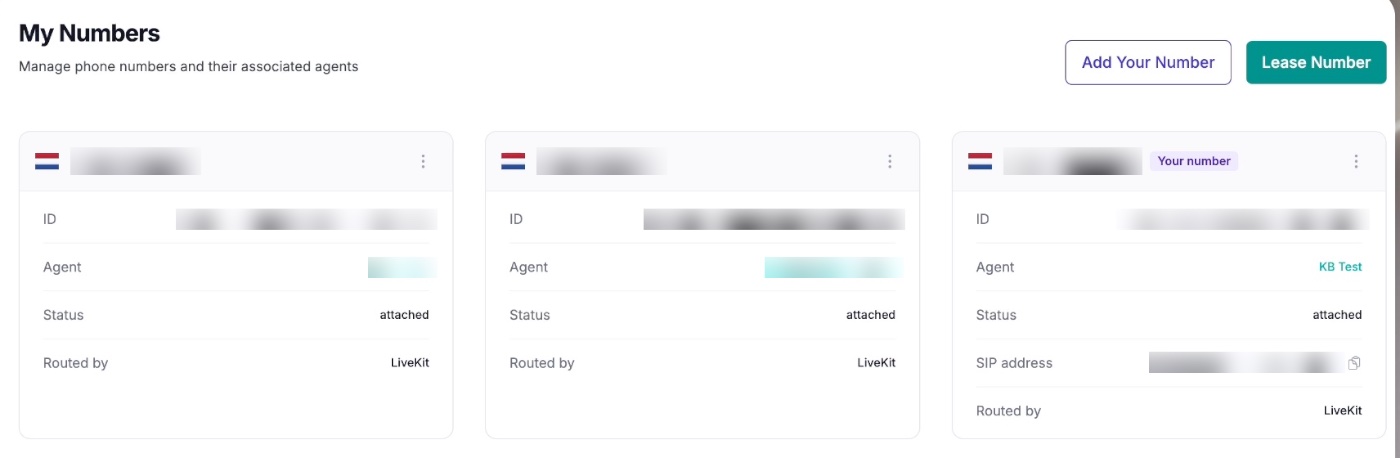
In the side menu, open My Numbers.
-
Click Add Your Number.
-
In the Add Your Number dialog, pick the country with the flag selector. The country code is filled in for you. Then enter the rest of your number without the leading zero (for example
+31 970 1025 4023, not+31 0970 …).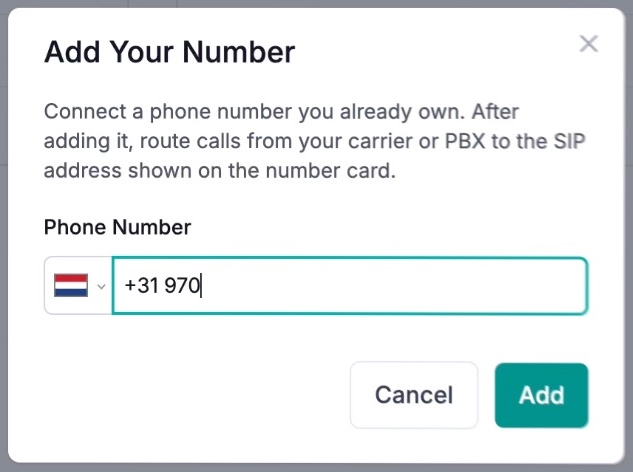
-
Click Add.
Your number now appears as a card labelled Your number:
| Field | What it shows |
|---|---|
| ID | The unique ID of this number. Include it when you contact support. |
| Agent | The agent that answers calls to this number |
| Status | The current state of the number, for example attached |
| SIP address | Where your carrier or PBX must send calls, for example sip:luvjtjd3aor.sip.livekit.cloud. Use the copy icon to copy it. |
| Routed by | The SIP infrastructure that receives the call |
-
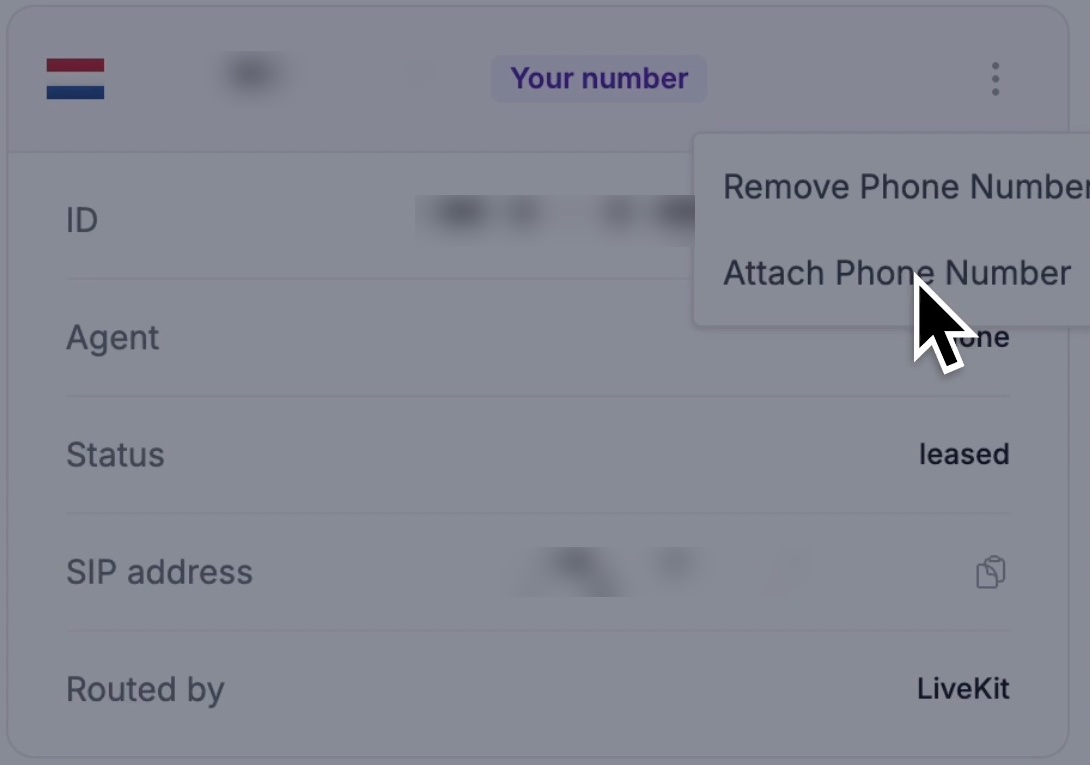
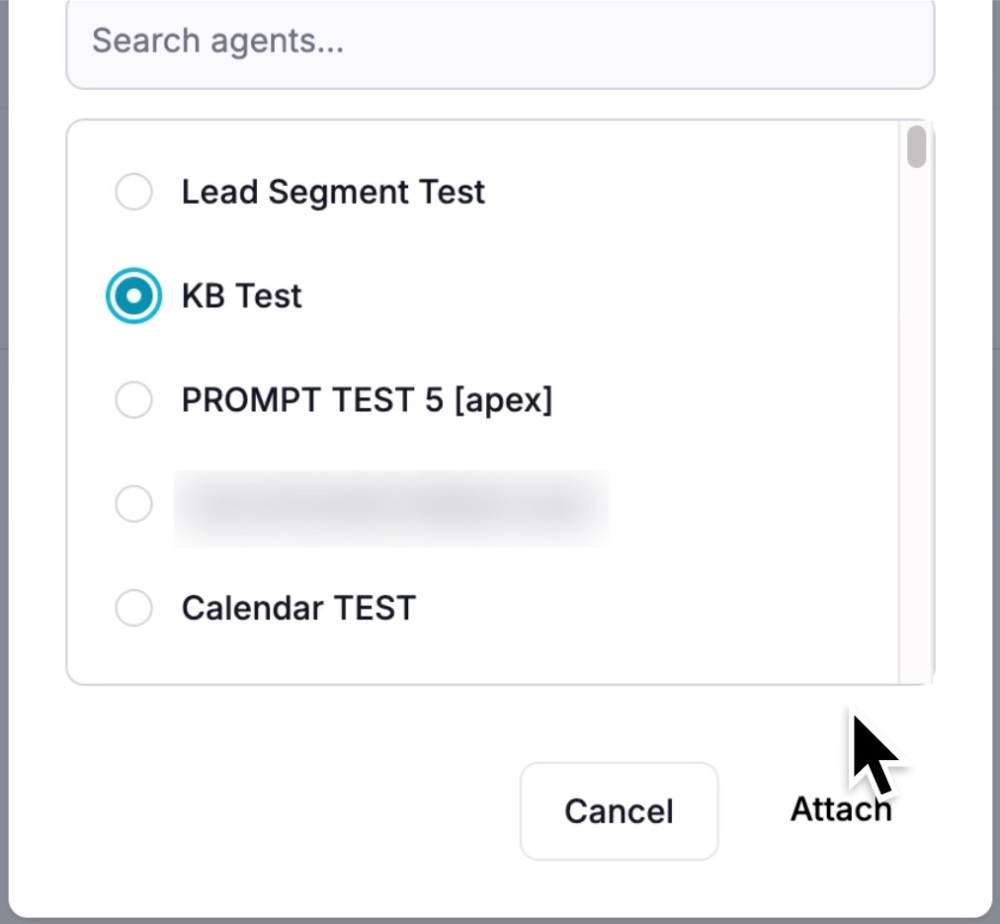
Attach the number to an agent. Once it is attached, the Agent row shows the agent's name. A number without an agent cannot answer calls.
Step 2: Route calls to the SIP address
Every carrier and phone system does this a little differently, so follow the matching provider guides. These rules apply to all of them.
Use the SIP address from your number card
Copy it with the copy icon on the card. What you enter depends on what the field in your system asks for:
| The field asks for | Enter | Example |
|---|---|---|
| A SIP URI | The SIP address exactly as shown | sip:YOUR_SIP_DOMAIN |
| A domain, host, FQDN or registrar | The SIP address without sip: | YOUR_SIP_DOMAIN |
| A full destination address | Your number in E.164, then @, then the domain | +31201234567@YOUR_SIP_DOMAIN |
Use TCP
Set the SIP transport on your trunk or connection to TCP. If your system allows several protocols on one trunk, turn the others off.
Send the number in E.164 format
The number your system sends must match the number on your card exactly: +, the country code, and the number without the leading zero.
| Country | ✅ Correct | ❌ Wrong |
|---|---|---|
| Netherlands | +31201234567 | 0201234567, +310201234567 |
| Germany | +4930123456 | 030123456, +49030123456 |
Pass the original caller ID
Make sure your system sends the caller's own number, not your business number. Otherwise every call looks as if it comes from you, and skills such as Get Contact by Phone Number, HubSpot contact matching and per-caller personalisation stop working.
Allow Kollie through your firewall (only if you restrict traffic)
Kollie's calls are carried by LiveKit Cloud (shown as Routed by: LiveKit on the number card). If your firewall or Session Border Controller (SBC) only accepts traffic from known addresses, allow these ranges:
143.223.88.0/21
161.115.160.0/19
153.57.128.0/18
- Allow both SIP signalling and audio (media), over UDP and TCP. Calls use TCP for signalling, but the audio travels separately.
- If even one range is blocked, calls may not arrive, or they may connect without audio.
- LiveKit publishes these ranges and may update them. You can always find the current list in LiveKit's "Regions and endpoints" documentation.
If your firewall doesn't restrict incoming SIP traffic, you can skip this.
Step 3: Decide when the agent takes the call
Most phone systems let you choose when calls go to the agent. Common choices:
- Every call to the number
- Only unanswered calls: your team rings first, and the agent takes over if nobody picks up
- Outside business hours
- Overflow from a ring group or queue
The provider guides show where to set this in each system.
Step 4: Test
Call your number from another phone and check:
- The agent attached to the number answers.
- The caller's real number appears in Agent Calls History, not your business number.
- Audio works in both directions.
- If you set up a rule for unanswered calls or out-of-hours calls, it triggers as expected.
- If the agent uses the Call Transfer skill, a transfer back to your team works.
Tip: for every test call, note the date, exact time, caller number and dialled number. With these details, we can find a failed call in our logs quickly.
Kollie connection details
A quick reference for everything above.
| Setting | Value |
|---|---|
| Where to add a number | My Numbers → Add Your Number |
| SIP address | Shown on each number card, for example sip:1l2gwoz0vqv.sip.livekit.cloud |
| SIP domain | The SIP address without sip: |
| Full destination address | +<number in E.164>@YOUR_SIP_DOMAIN |
| Number format | E.164 (+, country code, no leading zero) |
| Transport | TCP |
| IP ranges (only if your firewall restricts traffic) | 143.223.88.0/21, 161.115.160.0/19, 153.57.128.0/18 |
| Authentication | None. No username, password or SIP registration. |
Requirements
- A Kollie agent that is already set up.
- A phone number you own, with a carrier or phone system that can send calls to a SIP address over TCP.
- Admin access to your phone system or carrier portal, or a PBX administrator who can make changes.
- If your network restricts SIP traffic: access to your firewall or SBC.
Other phone systems
Your system is not in the provider guides? It can usually still be connected if it:
- can send calls to a SIP address or hostname (a static/peer trunk, or a "forward to SIP URI" option),
- supports TCP for SIP,
- sends the dialled number in E.164 format, and
- accepts audio from the LiveKit ranges, if your firewall restricts traffic.
Get in touch and we'll look at your system with you.
If the connection doesn't work
| Check | Why it matters |
|---|---|
| Does the Agent row on the number card show an agent? | Calls to a number without an agent can't be answered. |
Does the number your system sends match the number card exactly, including +? | Kollie uses the dialled number to find your number card. |
Did you remove sip: wherever the field asks for a domain or host? | Many systems reject the address when the prefix is included. |
| Is the SIP address copied completely? | A truncated address is a common cause of rejected calls. |
| Is the transport set to TCP? | Calls sent over another protocol may not reach Kollie. |
| Is the trunk a static/peer trunk, not a registration-based one? | Kollie doesn't use SIP registration. |
| If you restrict traffic: are all three LiveKit ranges allowed, for SIP and audio, over UDP and TCP? | One blocked range can cause missing calls or one-way or silent audio. |
| Has your provider enabled SIP or FQDN routing on your plan? | Some providers require activation or a paid add-on. |
| Does the call appear in Agent Calls History? | If it does, the connection works and the problem is in the agent setup. |
Related articles
- Forward your business calls to your agentForward calls from your own business number to a Kollie AI agent, without changing the number your customers dial.
- Phone codes for call forwardingThe standard GSM and European service codes to activate, cancel and check call forwarding on landlines and mobile phones.
- Forward calls from your VoIP providerForward your business number to your Kollie AI agent from your VoIP provider's admin portal.
Still need help?
Can't find the answer you're looking for? Send us a ticket and our support team will help you set up and improve your agents.
Submit a support ticket