



Browse all articles
What skills can your agent use?
Skills let your AI agent perform automated tasks before, during or after a call: call APIs, extract data, transfer calls, book meetings and more.
Last updated:
On this page
In Kollie, skills let your AI agent perform specific automated tasks before, during or after a phone call.
They help your agent retrieve, send or process information without manual input, keeping every conversation smart, seamless and connected to your tools.
You can manage and configure skills in each agent's settings under the Skills tab. Depending on your workflow, you can use skills to integrate external systems, extract data from calls, or even schedule meetings.
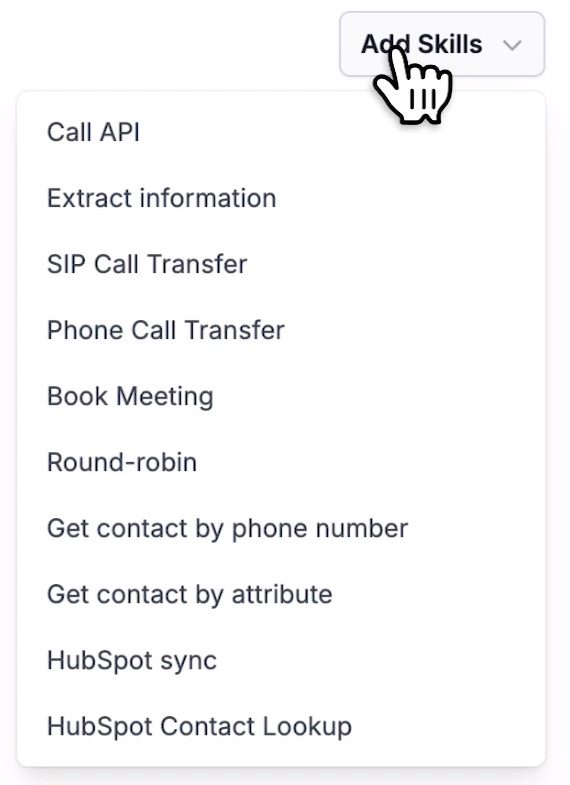
What skills can do
Each skill has a different purpose, but all share the same goal: to enhance your agent's capabilities. Here's an overview of the skills you can set up:
- Call API (before or after call): send or retrieve information from your system's API either before a call starts or right after it ends.
- External Action (during call): trigger an API call or data fetch in real time while the call is happening. See also Look up live data during a call.
- Information Extraction: automatically extract specific data points from the conversation, such as customer intent, chosen plan or preference.
- HubSpot Sync: sync call data directly to your HubSpot account.
- Call Transfer: transfer the caller to a live agent or another department when needed.
- Book Meeting: schedule a meeting directly during the call, integrated with Outlook and Google Calendar.
- Round Robin: distribute meeting bookings evenly among multiple calendars or team members.
- Get Contact by Phone Number: automatically look up existing contacts based on the caller's phone number.
- Get Contact by Attribute: retrieve a contact based on specific attributes like email, customer ID or tag.
Why use skills
With skills, your AI agent can go beyond conversation: it can take action.
This means fewer manual tasks, faster workflows and smarter customer experiences. Whether you want to record data, sync it with your CRM, or let the agent handle appointments automatically, skills make it possible.
Every skill description is read by the agent during the call. Learn how to write good ones in How to build your AI phone agent (section 5.7).
Related articles
- Look up live data during a callLet your agent call an API in the middle of a conversation, based on what the caller says, and use the result in its next reply.
- Transfer calls to a person or departmentLet your AI agent hand an active call over to a person, a department or an external partner, and pick the right destination.
- Capture details from every call automaticallyAutomatically capture key details from every conversation, such as the caller's name, interest level or chosen product.
Still need help?
Can't find the answer you're looking for? Send us a ticket and our support team will help you set up and improve your agents.
Submit a support ticket